Video: OTT Fundamentals & hands-on video player lab

Whilst there are plenty of videos explaining the basics streaming, few of them talk you through the basics of actually implementing a video player on your website. The principles taught in this hands-on Bitmovin webinar are transferable to many players, but importantly at the end of this talk you’ll have your own implementation of a video player which you can make in real time using their remix project at glitch.com which allows you to edit code and run it immediately in the browser to see your changes.

Ahead of the tutorial, the talk both explains the basics of compression and OTT led by Kieran Farr, Bitmovin’s VP of marketing and Andrea Fassina, Developer Evangelist. Andrea outlines a simplified OTT architecture where he looks at the ‘ingest’ stage which, in this example, is getting the videos from Instagram either via the API or manually. It then looks at the encoding step which compresses the input further and creates a range of different bitrates. Andrea explains that MPEG standards such as H.264, H.265 are commonly used to do this making the point that MPEG standards typically require royalty payments. This year, we are expecting to see VVC released by MPEG (H.266).

Andrea then explains the relationship between resolution, frame rate and file sizes. Clearly smaller files are better as they require less time to download leading to quicker downloads so faster startup times. Andrea discusses how the resolutions match the display resolutions with TVs having 1920×1080 resolution or 2160×3840 resolution. Given that higher resolutions have more picture detail, there is more information to be sent leading to larger file sizes.
Source: Bitmovin https://bit.ly/2VwStwC

When you come to set up your transcoder and player, there are a number of options you need to set. These are determined by these basics, so before launching into the code, Andrea looks further into the fundamental concepts. He next looks at video compression to explain the ways in which compression is achieved and the compromises within. Andrea starts from the first MJPEG codecs where each frame was its own JPEG image and they simply animated from one JPEG to another to show the video – not unlike animated GIFs used on the internet. However by treating each frame on its own ignores a lot of compression opportunity. When looking at one frame to the next, there are a lot of parts of the image which are the same or very similar. This allowed MPEG to step up their efforts and look across a number of frames to spot the similarities. This is typically referred to as temporal compression as is it uses time as part of the process.

In order to achieve this, MPEG splits all frames into blocks, squares in AVC, which are called macro blocks which be compared between frames. They then have 3 types of frame called ‘I’, ‘P’ and ‘B’ frames. The I frames have a complete description of that frame, similar to a JPEG photograph. P frames don’t have a complete description of the frame, rather they some blocks which have new information and some information saying that ‘this block is the same as this block in this other frame. B frames have no complete new image parts, but create the frame purely out of frames from the recent future and recent past; the B stands for ‘bi-directional’.

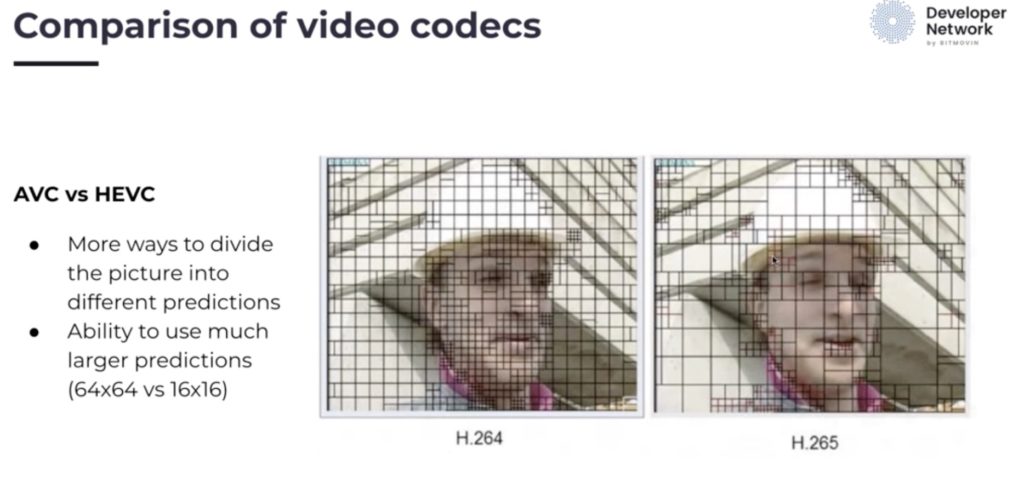
Ahead of launching into the code, we then look at the different video codecs available. He talks about AVC (discussed in detail here), HEVC (detailed in this talk) and compares the two. One difference is HEVC uses much more flexible macro block sizes. Whilst this increases computational complexity, it reduces the need to send redundant information so is an important part of the achieving the 50% bitrate reduction that HEVC typically shows over AVC. VP9 and AV1 complete the line-up as Andrea gives an overview of which platforms can support these different codecs.
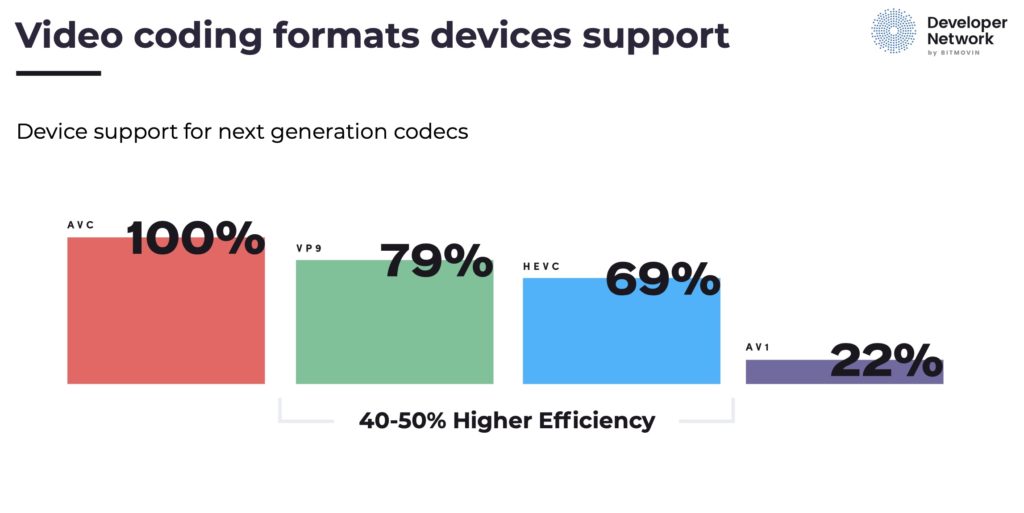
Source: Bitmovin https://bit.ly/2VwStwC

Andrea then introduces the topic of Adaptive bitrate, ABR. This is vital in the effective delivery of video to the home or mobile phones where bandwidth varies over time. It requires creating several different renditions of your content at various bitrates, resolutions and even frame rate. Whilst these multiple encodes put a computational burden on the transcode stage, it’s not acceptable to allow a viewer’s player to go black, so it’s important to keep the low bitrate version. However there is a lot of work which can go into optimising the number and range of bitrates you choose.

Lastly we look at container formats such as MP4 used in both HLS and MPEG-DASH and is based on the file format ISO BMFF. Streaming MP4 is usually called fragmented MP4 (fMP4) as it is split up into chunks. Similarly MPEG2 Transport Streams (TS files) can be used as a wrapper around video and audio codecs. Andrea explains how the TS file is built up and the video, audio and other data such as captions are multiplexed together.

The last half of the video is the hands-on section during which Andrea talks us through how to implement a video player in realtime on the glitch project allowing you to follow along and do the same edits, seeing the results in your browser as you go. He explains how to create a list of source files, get the player working and styled correctly.

Watch now!
Download the presentation
Speakers

Kieran Farr Kieran Farr
VP of Marketing,
Bitmovin
Andrea Fassina Andrea Fassina
Developer Evangelist,
Bitmovin

Video: Tech Talks: Low-Latency Live Streaming

There are a number of techniques for achieving low-latency streaming. This talk is one of the few which introduces them in easy to understand ways and then puts them in context briefly showing the manifests or javascript examples of how these would be seen in the wild. Whilst there are plenty of companies who don’t need low-latency streaming, for many it’s a key part of their offering or it’s part of the business model itself. Knowing the techniques in play is to better understand internet streaming in general.

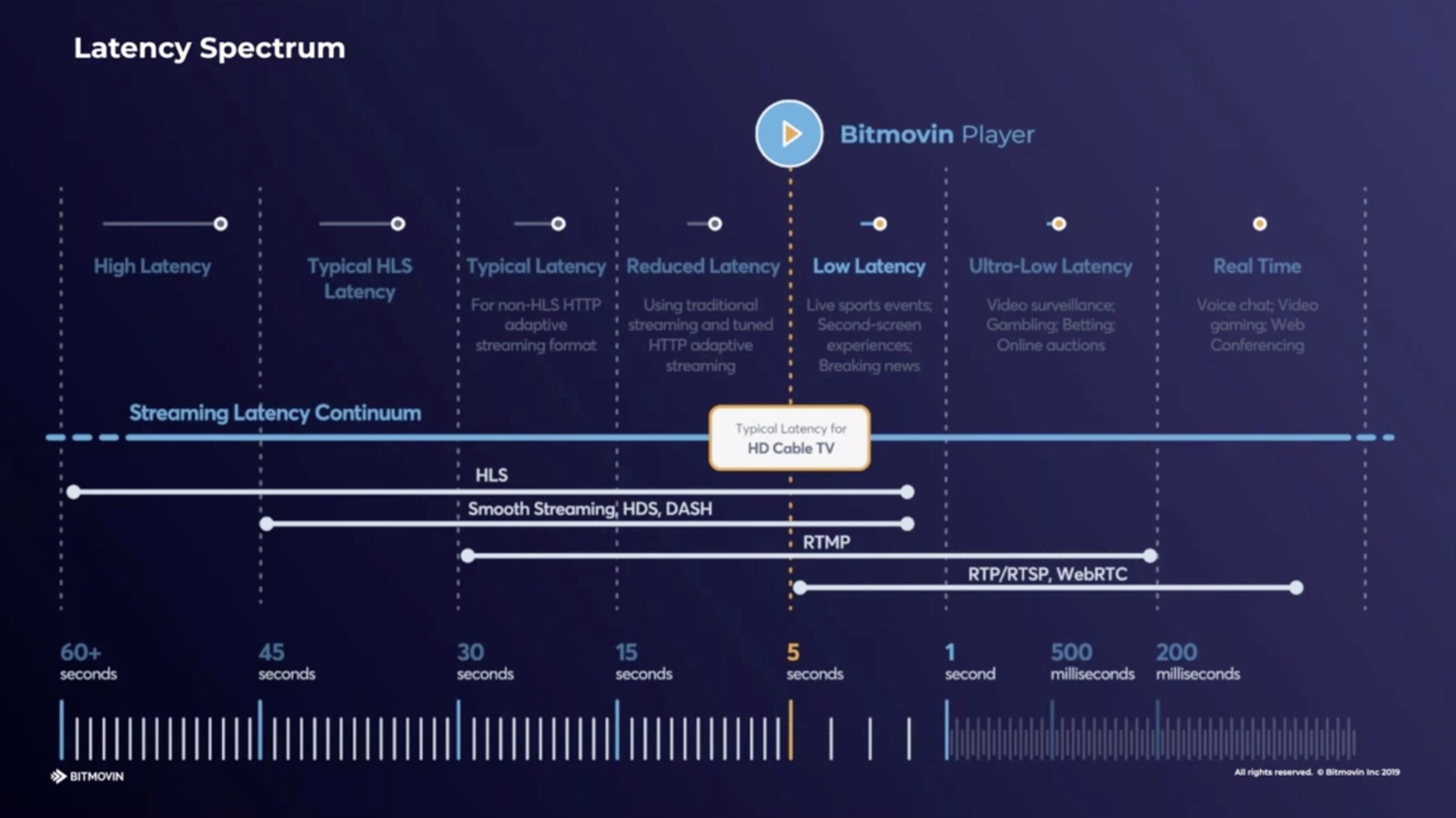
Jameson Steiner from Bitmovin starts by explaining why there is a motivation to cut the latency. One big motivation, aside from the standard live sports examples, is user-generated content like on Twitch where it’s very clear to the streamer, and quite off-putting, when there is large amounts of delay. Whilst delay can be adapted to, the more there is the less interaction is possible. In this situation, it’s the ‘handwaving’ latency that comes in to play. You want the hand on the screen to wave pretty much at the same time as your hand waves in front of the camera. Jameson places different types of distribution on a chart showing latency and we see that low-latency of 5 seconds or less will not only match traditional TV broadcasts, but also work well for live streamers.

Naturally, to fix a problem you need to understand the problem, so Jameson breaks down the legacy methods of delivery to show why the latency exists. The issue comes down to how video is split into sections, say 6 seconds, so that the player downloads a section at a time, reassembles and plays them. Looking from the player’s perspective, if the network suddenly broke or reduced its throughput, it makes sense to have several chunks in reserve. Having three 6-second chunks, a sensible precaution, makes you 18 seconds behind the curve from the off.

Clearly reducing the segement size is a winner in this scenario. Three 3 second segments will give you just 9 seconds latency; why not go to 1 second? Well encoding inefficiency is one reason. If you reduce the amount of time a temporal codec has of a video, its efficiency will drop and bitrate will increase to maintain quality. Jameson explains the other knock-on effects such as CDN inefficiencies and network requests. The standardised way to avoid these problems is to use CMAF (Common Media Application Format) which is based on MPEG DASH and ISO BMFF. CMAF, and DASH in general, has the benefit of coming from a standards body whose aim was to remove vendor lock-in that may be felt with HLS and was certainly felt with RTMP. Check out MPEG’s short white paper on the topic (zipped .docx file)

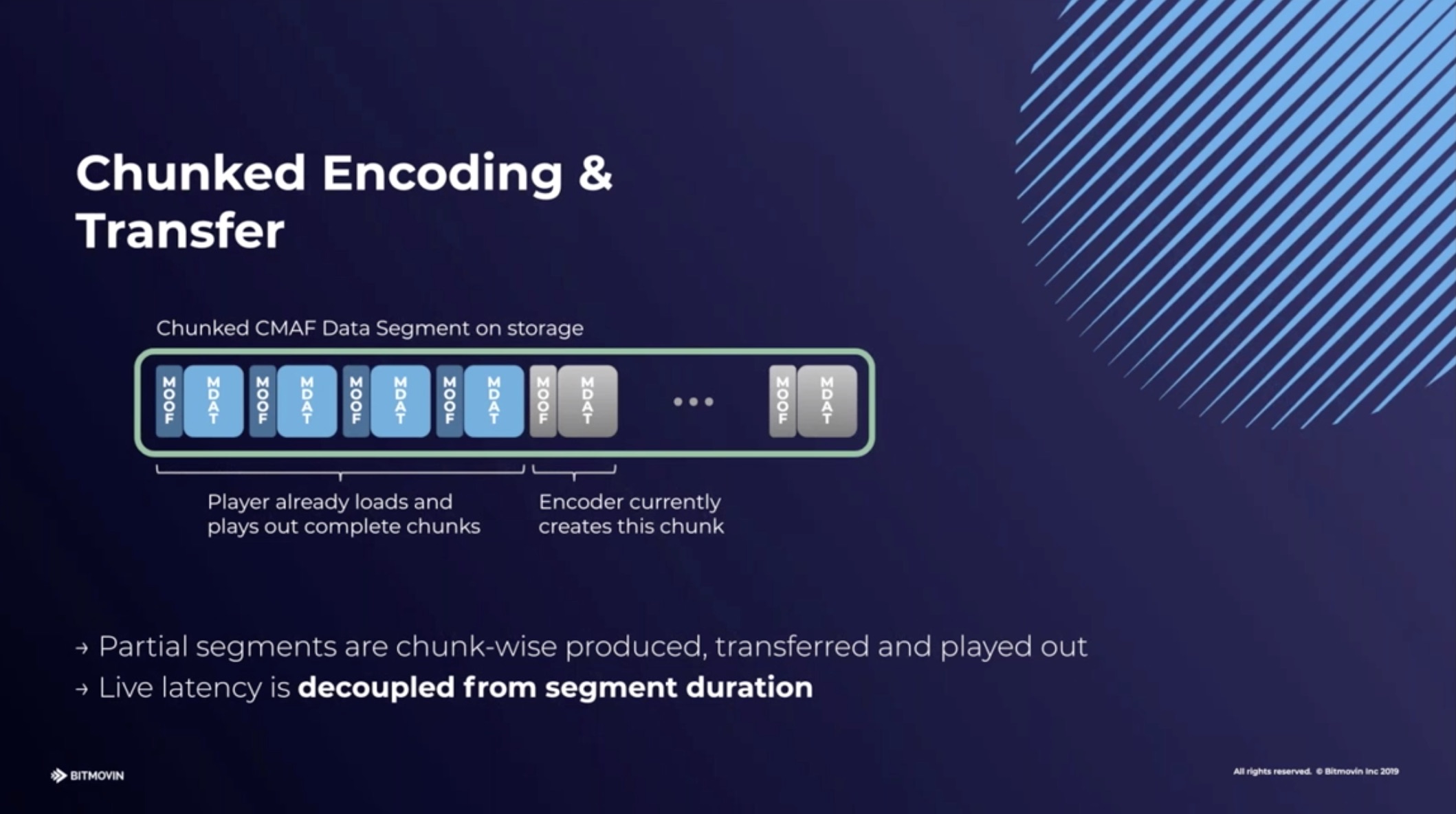
CMAF uses chunked transfer meaning that as the encoder writes the data to the disk, the web server sends it to the client. This is different to the default where a file is only sent after it’s been completely written. This has the effect of the not having to wait up to 6 seconds to a 6-second chunk to start being sent; the download time also needs to be counted. Rather, almost as soon as the chunk has been finished by the encoder, it’s arrived at the destination. This is a feature of HTTP 1.1 and after so is not new, but it still needs to be enabled and considered as part of the delivery.

CMAF goes beyond simple HTTP 1.1 chunked transfer which is a technique used in low-latency HLS, covered later, by creating extra structure within the 6-second segment (until now, called a chunk in this article). This extra structure allows the segment to be downloaded in smaller chunks decoupling the segment length from the player latency. Chunked transfer does cause a notable problem however which has not yet been conclusively solved. Jameson explains how traditionally each large segment typically arrives faster than realtime. By measuring how fast it arrives, given the player knows the duration, it can estimate the bandwidth available at that time on the network. With chunked transfer, as we saw, we are receiving data as it’s being created. By definition, we are now getting it in realtime so there is no opportunity to receive it any quicker. The bandwidth estimation element, as shown the presentation, is used to work out if the player needs to go down or could go up to another stream at a different bitrate – part of standard ABR. So the catastrophe here is the going down in latency has hampered our ability to switch bitrates and whilst the viewer can see the video close to real-time, who’s to say if they are seeing it at the best quality?

Low-Latency HLS/DASH is a way of extending DASH and HLS without using CMAF. Jameson explains some techniques such as advertising segments in advance to allow players to pre-request. It also relies on finding the compromise point of encoding inefficiency vs segment length, typically held to be around 2 seconds, to minimise the latency. At this point we start seeing examples of the techniques in manifests and javascript allowing us to understand how this is actually signalled and implemented.

Apple is on its second major revision of LL-HLS which has responded to many of the initial complaints from the community. Whilst it can use HTTP/2 to help push segments out, this caused problems in practice so it can now preload hints, as Jameson explains in order to remove round-trip times from requests. Jameson looks at the other of Apple’s techniques and shows how they look in manifest files.

The final section looks at problems in implementing these features such as chunks being fragmented across TCP packets, the bandwidth estimation question and dealing with playback speed in order to adjust the players position in time – speed-ups and slow-downs of 5 to 10% can be possible depending on content.

Watch now!
Download the presentation
Speaker

Jameson Steiner Jameson Steiner
Software Engineer,
Bitmovin

Video: Versatile Video Coding (VVC)

MPEG’s VVC is the next iteration along from HEVC (H.265). Whilst there are other codecs being finalised such as EVC and LCEVC, this talk looks at how VVC builds on HEVC, but also lends its hand to screen content and VR becoming a more versatile codec than HEVC, meeting the world’s changing needs. For an overview of these emerging codecs, this interview covers them all.

VVC is a joint project between ITU-T and MPEG (AKA ISO/IEC). Its aim is to create a 50% encoding efficiency in bitrate for the same quality picture, with the emphasis on higher resolutions, HDR and 10-bit video. At the same time, acknowledging that optimising codecs on natural video is no longer the core requirement for a lot of people. Its versatility comes from being able to encode screen content, independent sub-picture encoding, scalable encoding among others.

Gary Sullivan from Microsoft Technology & Research talks us through what all this means. He starts by outlining the case for a new codec, particularly the reach for another 50% bitrate saving which may come at further computational cost. Gary points out that, as video use continues to increase, anything that can be done to significantly reduce bitrates will either drive down costs or allow people to use video in better ways.

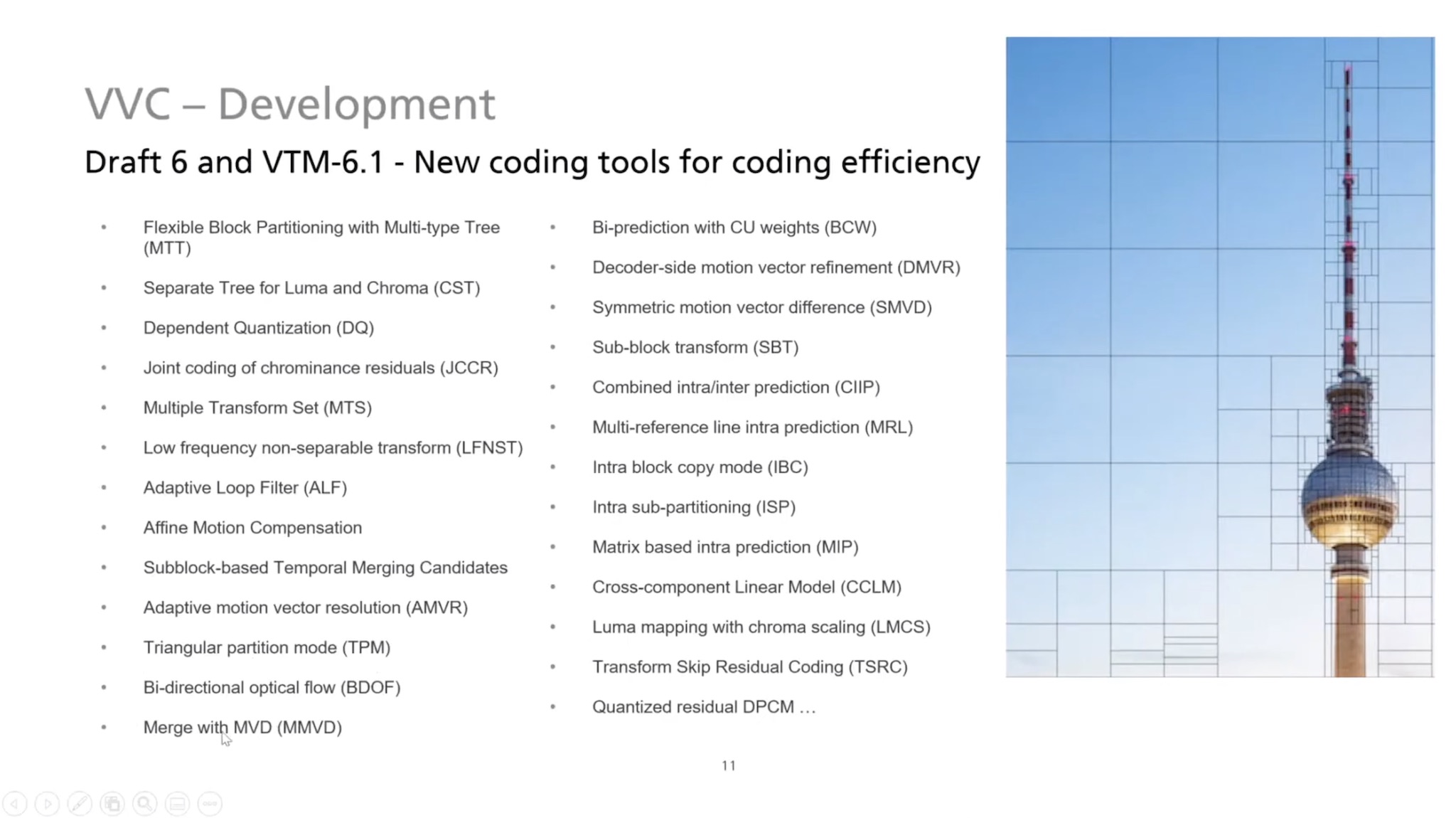
Any codec is a set of tools all working together to create the final product. Some tools are not always needed, say if you are running on a lower-power system, allowing the codec to be tuned for the situation. Gary puts up a list of some of the tools in VVC, many of which are an evolution of the same tool in HEVC, and highlights a few to give an insight into the improvements under the hood.

Gary’s pick of the big hitters in the tool-set are the Adaptive Loop Filter which reduces artefacts and prediction errors, affine motion compensation which provides better motion compensation, triangle partitioning mode which is a high-computation improvement in intra prediction, bi-directional optical flow (BIO) for motion prediction, intra-block copy which is useful for screen content where an identical block is found elsewhere in the same frame.

Gary highlights SCC, Screen Content Coding, which was in HEVC but not in the base profile, this has changed for VVC so all VVC implementations will have SCC whereas very few HEVC implementations do. Reference Picture Resampling (RPR) allows changing resolution from picture to picture where pictures can be stored at a different resolution from the current picture. And independent sub-pictures which allow parts of the video frame to be re-arranged or only for only one region to be decoded. This works well for VR, video conferencing and allows the creation of composite videos without intermediate decoding.

As usual, doing more thinking about how to compress a picture brings further computational demands. MPEG’s LCEVC is the standards body’s way of fighting against this, as notable bitrate improvements are possible even for low-power devices. With VVC, versatility is the aim, however. Decoders see a 60% increase in decode complexity. Whilst MPEG specifications are all about the decoder – hence allowing a lot of ongoing innovation in encoding techniques – current examples are about 8 or 9 times slower. Performance is better for screen content and on higher resolutions. Whilst the coding part of VVC is mature, versatility is still being worked on but the aim is to publishing within about 2 months.

The video finishes with a Q&A that covers implementing DASH into a low-latency video workflow. How CMAF will be specified to use VVC. Live workflows which Gary explains always come after the initial file-based work and is best understood after the first attempts at encoder implementations, noting that hardware lags by 2 years. He goes on to explain that chipmakers need to see the demand. At the moment, there is a lot of focus from implementors on AV1 by implementors, not to mention EVC, so the question is how much demand can be generated.

This talk is based on talk from Benjamin Bross originally given to an ITU workshop (PDF), then presented at Mile High Video by Benjamin and was updated by Gary for this conversation with the Seattle Video Tech community.

Bitmovin has an article highlighting many of the improvements in VVC written by Christian Feldmann who has given many talks on both AV1 and VVC.

Watch now!

Speakers

Gary Sullivan Gary Sullivan
Microsoft Technology & Research

Video: High-Efficiency Video Coding (HEVC) Primer

HEVC continues to gain adoption thanks to its bitrate savings over AVC (H.264), though much stands in the balance this year as AV1 continues to gain momentum and MPEG’s VVC is released. Both of which promise greater compression. Compression, however, is a compromise between encoding complexity (computation), quality and speed. HEVC stands on the shoulders of AVC and this video explains the techniques it uses to be better.

Christian Timmerer, co-founder of Bitmovin, builds on his previous video about AVC as he details the tools and capabilities of HEVC (all known as H.265). He summarises the performance of HEVC as providing twice as much compression for the same video quality (or getting better quality for a higher number of bits). Whilst it’s decoder requirements have gone up by 50%, it provides better parallelisation opportunities. Amongst the features that create this are variable block-size motion compensation, improved interpolation method and more directions for spatial prediction. Most of the improvements are specifically an expansion of the abilities laid out in AVC. For instance, making size or direction variable or providing more options.

After outlining some of the details behind the new capabilities, we look at the performance improvements of some HEVC implementations over AVC implementations showing up to a 65% improvement of bitrate averaging out at around 50%. Christian finishes by looking at the newer codecs coming out soon such as VVC, LCEVC

Watch now!
Speakers

Christian Timmerer Christian Timmerer
CIO & Cofounder, Bitmovin
Associate Professor, Universität Klagenfurt